Search This Site

Custom Search
|
 |
|||
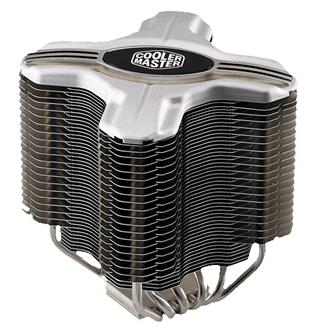
Cooler Master Hyper Z600 ReviewCPU Temperature Software Will Help Monitor Your SystemThe Cooler Master Hyper z600 is a CPU heatsink for cooling your system. Use CPU temperature software to monitor CPU temperature. Recognize that cooling is impacted by the case material (aluminum, steel or acrylic computer cases) used and the style of case (tower, mini, slim, mid size, etc) which allows good airflow (or not). The Cooler Master Hyper Z600 is aimed at all three types of users. Whether you are looking for passive cooling, extreme, or a combination, they claim that this cooler will handle all situations. So how does it stack up?
First off, the Hyper Z600 is designed to work with both Intel and AMD processors in the following chipsets:
The Cooler Master Hyper Z600 is definitely not made for small cases. Measuring 128 x 128 x 160 mm, you will want to have at least 7 inches of clearance between your CPU and the door of your case to install this heatsink. Another thing to keep in mind is the weight. At 1045 g, it's not particularly light. That, however, is taken care of with the mounting brackets included. The heatsink includes everything you will need to properly mount it:
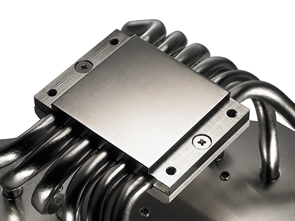
The Z600 is designed for use with 120 mm fans, and Noctua fans will do a great job of pushing air through the fins, and keeping the system quiet. One of the ways that cpu heatsinks are judged is by the flatness of the base. In the case of the Hyper Z600, the base is nearly perfect, with a nicely machined nickel plated copper finish. Coming from the base are 6 copper heat pipes leading up the nicely spaced aluminum fins. The unique "X" shape of the heatsink was designed to allow more air to pass through for better cooling. Installation
The Cooler Master Hyper Z600 uses a bit of a different approach to installing the main unit. The majority of coolers are installed from the top, by screwing the base unit into the back plate through the motherboard. The Z600 however, is secured by 4 nuts that are secured from the back of the motherboard. Not a big deal, until you want to want to switch out coolers. Fortunately, this will probably be a rare occurrence. Holding the main unit in place, secure it on the back of the motherboard with the 4 nuts using the included hexagonal wrench. The instructions were pretty easy to follow.
Temperature Control: Monitor CPU Temperature
When tested under load as a true passive heatsink, the Cooler Master Hyper Z600 performed quite well, maintaining temperatures below 40C when idle, but reaching 62C under load. That is within acceptable levels, but a little higher than I personally prefer. However, once a fan is added, temperatures were maintained at around 39C idle and 53C under load. That is well within acceptable limits, and temperatures that I would be quite happy with. Even when used on an overclocked processor, temperatures were maintained at 55C under full load.
ConclusionPros:
Cons:
ConclusionIt takes a well designed heatsink to perform well in passive mode, and the majority of heatsinks are not designed to do this. The Cooler Master Hyper Z600 however performs very well in passive mode. The ability to install this heatsink on both Intel and AMD chipsets is a very nice feature that helps it to stand out from the crowd. With 6 heat pipes running from the base to the cooling fins, heat is transferred from the CPU to the fins quickly and efficiently. If you are looking for a great heatsink for overclocking, this one will keep you happy. However, if you are not overclocking, the price is relatively high, and you can get decent cooling for less. Return to Computer Cooling from the Cooler Master Hyper Z600 Review |
|
|||
|




|
||||
|
| Home Page | Motherboards | CPU | Memory | Computer Drives | Graphics | Power Supply
| Input Devices |
| Output Devices | Cooling | Cases | Modems | Troubleshooting | Computer Guides | Buying Guide | | Free Games | Computer Software | Green Computers | Ultra Mobile PC | Glossary | Builder's Corner | | Site Index | Contact Us | Advertising | Return to top
Copyright© 2008-2014. Voice Marketing Inc. All Rights Reserved. Read our Privacy Policy. |
||||
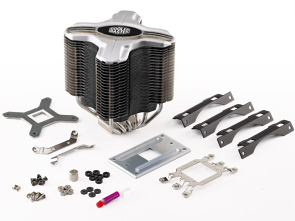
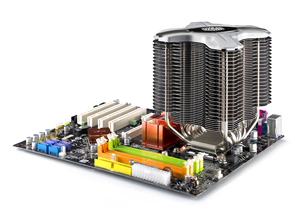 Installing this monster takes a bit of doing. The first step is to install the clips on the base of the heatsink. They simply screw into place on the base, get them nice and secure. Next, you'll need to install the back plate on the back of your motherboard. Nothing special, just your typical back plate install.
 The CPU used for testing was the Intel Quad Q9450 which will put out some good heat with all four cores running full out. Monitor CPU temperature using CPU temperature software (prior to buying your CPU check CPU reviews and get feedback on what the average temperatures for the units are).