Search This Site

Custom Search
|
 |
|||
What is a Motherboard?
Choosing a Motherboard that Best Fits Your Computer BuildKnowing what is a motherboard and how to install a motherboard is key to building a computer. One of your most important system decisions is to choose a motherboard cpu bundle. What are the primary and secondary motherboard parts? What is a Motherboard?I've talked about this on other pages but here's a quick review: The motherboard is the primary connection point for all other components in the computer system. The motherboard connects the CPU, sockets, chipsets, BUS, and peripherals. You need to define how much memory you might need before you select your motherboard. Think of the motherboard as the 'central nervous system' of your system; it needs to be in good operating condition for good system performance. 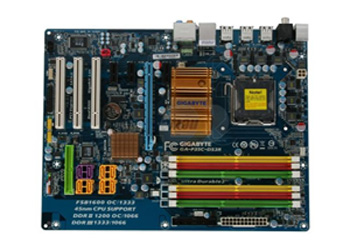
Motherboard Parts
Have a Closer Look at a Motherboard diagram...
Choosing a MotherboardMy recommendations of the best motherboard for your computer are really dependent on what you need to use your computer for: a high performance, high use, graphic system; a high speed, great graphics gaming computer; a mid range computer for home office use; a low cost, basic performance computer system; and more. Remember that the motherboard and processor (CPU) need to be compatible - they work together in combination. So because there are fewer processor options, choose your processor first; then focus in on the best motherboard for your needs. Check the tab at the top of the page for even more motherboard reviews. Return to Top of 'What is a Motherboard?' Secondary Motherboard Parts: Motherboard Odds And EndsThese are things that you will not take into account when selecting the best motherboard for your computer, but are still important to know. BIOS - Computer Basic Input/Output SystemThe BIOS is what allows your computer to boot up. It is built-in software that directs what the computer does without accessing programs from an outside resource; it starts up the process by initiating communications with the different components. Before you start building, you should read the detailed BIOS information, but for now, just be aware that the BIOS comes preloaded on the motherboard. On personal computers, the BIOS controls the keyboard, disk drives, display screen, serial communications and other functions. Learn More About Computer BIOS...
Battery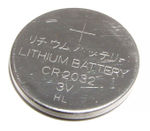
This little battery looks a lot like a large watch battery. It provides a tiny bit of power to the CMOS so that the BIOS settings are not lost. You'll know it's time to change the battery when you notice that your computer is not keeping the correct time anymore. These batteries usually last 3 to 5 years or so. They are inexpensive and easy to change, so don't worry about it until you need one.
To build your own computer, you need a good understanding of what is a motherboard, how to install a motherboard, and what are the available best motherboards. Motherboard Reviews
Gigabyte GA-MA78GM-S2H
MSI P35 Neo2-FR
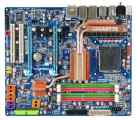
Gigabyte GA-EX38T-DQ6
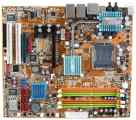
Abit AB9
|
Thanks for
|
|||




Need help diagnosing computer problems or challenges? Check out our troubleshooting page for common computer building issues.
| Output Devices | Cooling | Cases | Modems | Troubleshooting | Computer Guides | Buying Guide |
| Free Games | Computer Software | Green Computers | Ultra Mobile PC | Glossary | Builder's Corner |
| Site Index | Contact Us | Advertising |
Return to top
Copyright© 2008-2014. Voice Marketing Inc. All Rights Reserved. Read our Privacy Policy.