Search This Site

Custom Search
|
 |
|||
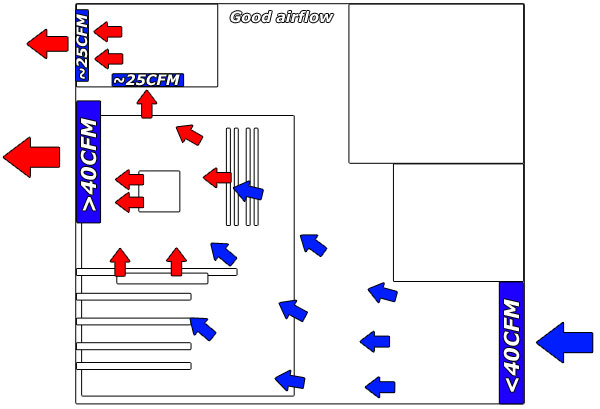
Computer Tower CasesAlien Computer Cases Aren't That Alien (they are made for Gaming Systems)Computer tower cases are a popular style; wholesale computer cases, Antec computer cases, Alien computer cases and more. A case is important to the lifespan of your computer by enabling effective airflow. By far, the most popular cases are computer tower cases. They are the easiest to work in, because of the room, and they are easy to place under a computer desk. When you are getting ready to purchase a computer case, here are a few things that you should take into consideration. AirflowThe airflow of a case is extremely important to the life of your computer. Poor airflow will trap heat inside the case which will reduce the life of your components. This is especially important in gaming computers, as the higher end components they use will produce more heat. Things you should take into consideration for good airflow:
Size
For gaming computers however, you will need to ensure that you have room for a few different components. As part of a gaming system, Alien computer cases have received some favorable feedback from gamers. Graphics cards can measure as much as 12 inches long, so you will need to ensure enough room from front to back, keeping in mind that the drive bays will also take up room in the front. If you are planning to use an aftermarket heatsink for improved CPU cooling, you'll want to ensure that you have enough room from side to side. Some heatsinks can get quite tall, and you may need as much as 8 inches of clearance from the top of the motherboard. If you will be installing multiple drives, make sure that you have enough drive bays to install them all. You will also want to take into consideration room for running your cables. Some computer tower cases will include room behind the motherboard to run cables to the various locations within the case. For gaming computers, take into consideration the placement of the fan mounting locations. You will want to make sure that you have enough locations, and that they are in the right place to provide proper airflow. Material and WeightComputer tower cases are made from a few different materials, with steel and plastic being the most common. If you need portability however, you may want to look at aluminum. Aluminum cases tend to cost a bit more, but are much lighter then steel, and much more sturdy than plastic. Aluminum cases will also help to keep heat levels down inside the case, as they conduct heat much better than steel or plastic. For a home office computer, this is not that big of a consideration. For a gaming computer, especially one that needs to be portable, you may want to seriously consider aluminum, even with the cost increase. ConclusionTake all these things into consideration when looking at computer tower cases. You will find that prices are going to range from $25.00 on the cheap side (try to find wholesale computer cases online), to $300.00 for the top end cases. Some cases will come with an included power supply. For a home office setup, this may be the most cost effective way to go. If potential noise from the case is an issue for you (particularly if you share office space), look at Antec computer cases for home office use. Antec has a series of cases with attributes like "quiet power supplies, sound-deadening side panels, and silicone grommets for the hard drives". They also provide a power efficient case with built in power supply. For a gaming computer however, the included power supply will usually not be able to power your system sufficiently. Taking airflow, layout, and weight into consideration will ensure that you purchase a computer case that will perform well for years to come, and will last through multiple upgrades. Return to Computer Cases from Computer Tower Cases Return to Build Your Own Computer Home Page |
Thanks for
|
|||
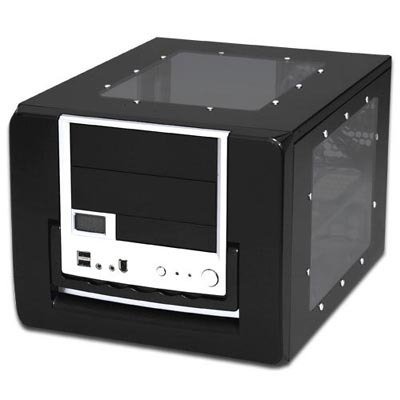 Determined in part by the form factor of your motherboard, you will want to ensure that the case you get has sufficient size to handle all the components you want to install. For a home office computer, you may not need a full tower case, and can go with a smaller form factor such as mini-ATX or micro-ATX. With smaller form factors, you can go with a smaller case.





Need help diagnosing computer problems or challenges? Check out our troubleshooting page for common computer building issues.
| Output Devices | Cooling | Cases | Modems | Troubleshooting | Computer Guides | Buying Guide |
| Free Games | Computer Software | Green Computers | Ultra Mobile PC | Glossary | Builder's Corner |
| Site Index | Contact Us | Advertising |
Return to top
Copyright© 2008-2014. Voice Marketing Inc. All Rights Reserved. Read our Privacy Policy.